ThingStudio is a new open-source tool that allows makers to build microcontroller applications using a visual flow-based interface rather than writing traditional linear code. Inspired by Node-RED, the platform enables users to connect functional blocks—such as sensors, timers, and MQTT modules—into logic chains that run on hardware like the ESP32, RP2040, and STM32.
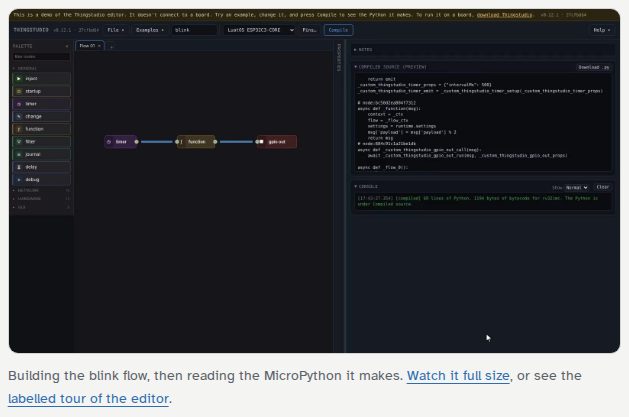
This image illustrates the visual flow-based interface where users connect functional blocks into logic chains.
Event-Driven Architecture vs. Main Loops
Most traditional microcontroller programs operate on a 'main loop' that continuously cycles through tasks, such as reading sensors and updating outputs. In this model, a slow step in one part of the loop can delay every other operation.
ThingStudio replaces this with an event-driven flow. In this system, the board waits on multiple events simultaneously—such as a button press, a timer expiration, or a network message—and only executes the specific logic chain associated with that event. This allows multiple independent chains, like a timer reading a sensor and a button lighting an LED, to run without blocking one another.
“A ThingStudio flow responds to events instead. Each response runs only when its event happens, and the board waits on many events at once.”
— ThingStudio: flow programming for microcontrollers
Compilation and Deployment Workflow
Unlike Node-RED, where the editor and runtime often coexist on the same computer, ThingStudio splits the environment into two distinct parts. The editor runs on a computer (or in a web browser) to compile the visual flow into MicroPython bytecode.
Once compiled, the bytecode is sent to the microcontroller. Because the flow is saved directly on the board, the program continues to run even after the cable is unplugged or the computer is turned off. Changes are deployed as new bytecode updates rather than full firmware builds, allowing for rapid iteration.
Hardware Support and Customization
The tool supports a variety of popular chips, including the ESP32 series, Raspberry Pi Pico (RP2040/RP2350), and nRF52840. It uses JSON definition files to map specific pins, LEDs, and communication buses (SPI, I2C) for each board.
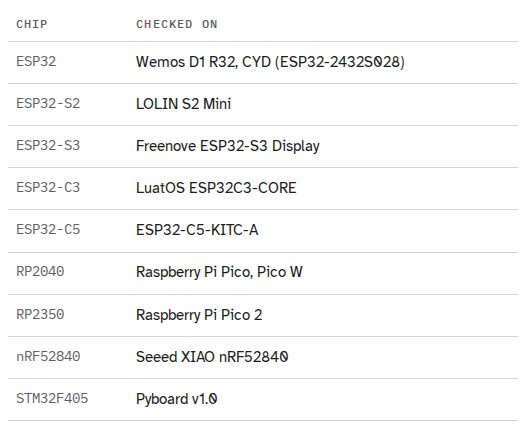
This table demonstrates how the tool maps specific pins and communication buses for various supported chips.
For hardware not included in the default list, users can provide a JSON definition file to describe the pinout. The compiler validates every pin in a flow against these definitions before deployment, ensuring that conflicting configurations or non-existent pins are caught before they reach the hardware.
Target Audience and Limitations
ThingStudio is designed for experienced makers and programmers who are comfortable with breadboards and terminal commands. It is specifically positioned as a tool for those who want to avoid hand-written asyncio code in MicroPython or for those whose Arduino C main loops have become unmanageably large.
The tool is not intended for absolute beginners learning the basics of programming, as it does not teach fundamental concepts. Additionally, because it runs on MicroPython, it may not be suitable for applications requiring hard-realtime performance or high-frequency sampling that would typically require a lower-level language like C.