Lampka is a new PDF reader for Windows that addresses the specific navigation challenges of reading long documents like theses, papers, and reports. Unlike many standard readers, it focuses on maintaining a user's place while navigating complex citations and providing a reading experience that adapts to different lighting conditions without distorting visual data.
Navigation and Layout Tools
Lampka is built to handle the non-linear reading required for academic work. It includes a 'Back' function that returns a reader to their exact previous position after clicking through a citation, figure, or link.
For complex layouts, the software offers a 'split view' where the same document appears twice, allowing the text to be read alongside its footnotes or exhibits. It also supports a 'two-page view' that pairs pages as they would appear in a printed book.
“Text and paper change colour while photos, diagrams and coloured drawings keep theirs”
— Lampka: the PDF reader for long documents (Windows)
Visual Comfort and Theme Customization
A primary differentiator for Lampka is its approach to dark mode. While many readers invert all colors, Lampka's night theme changes the text and paper colors while preserving the original colors of charts and illustrated manuals.
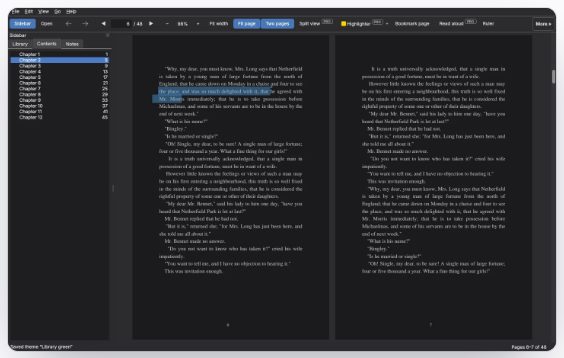
This visual illustrates the software's night theme and its ability to display pages in a book-like format.
The software remembers brightness and contrast settings separately for each theme. Users can also create and share custom theme files that hold specific color and brightness configurations.
Study Tools and Data Privacy
The software includes a highlighter and note-taking system that exports to Markdown. These highlights are kept by Lampka rather than being written into the PDF file, which ensures the original document remains unchanged.
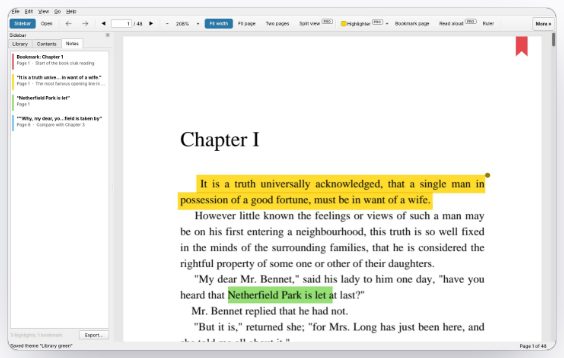
This screenshot demonstrates the highlighter and note-taking system where highlights are stored in a separate library.
Lampka operates offline and does not require an account. It recognizes documents by their content, meaning notes and progress are preserved even if the file is renamed or moved, while all data remains on the user's local machine or personal cloud storage.