Muesli is a native macOS application designed to provide local-by-default dictation and meeting transcription, specifically optimized for Apple Silicon hardware. By prioritizing on-device processing, the tool aims to offer a private alternative to services like Granola, WisprFlow, and Littlebird, where audio data is often processed in the cloud.
Privacy-First Architecture
Muesli's core design philosophy centers on keeping data local. Speech-to-text recognition runs on the user's Mac by default, and the app only sends content to hosted providers if the user explicitly opts into specific AI features.

This image captures the core philosophy of the application, which prioritizes local-first processing to ensure user privacy.
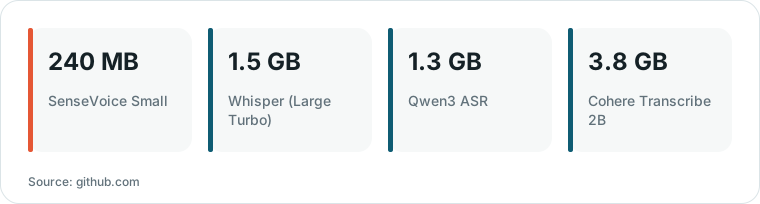
Chart drawn by HN Digest from figures reported by github.com; values are shown as written in the source.
While the app uses iCloud to sync text and metadata across devices, it is designed to never transfer audio files. This ensures that the raw recordings remain on the original device while the processed text remains accessible.
For meeting transcription, the app captures both microphone and system audio with speaker labels. It also supports importing existing files in formats like MP3, MP4, and WAV for re-transcription.
Model Flexibility and Customization
The application supports a diverse range of transcription models, allowing users to choose the best fit for their needs. Options include Apple Speech, Parakeet (Unified, v2, v3, Redux, and Realtime EOU), Nemotron 3.5, and SenseVoice.
Users can also customize their experience by adding technical terms, names, and replacement pairs to a personal dictionary. This dictionary can be imported or exported as a JSON file for use across the app and its command-line interface.
For those who prefer specific AI providers, Muesli allows integration with OpenAI, Anthropic, OpenRouter, and local inference engines like Ollama or LM Studio.
Meeting Management and Agent Integration
Beyond simple transcription, Muesli provides tools to turn meetings into actionable items. It includes templates for summarizing meetings and an 'Ask Meetings' workspace where users can query their history using the '@' symbol to attach specific meetings.
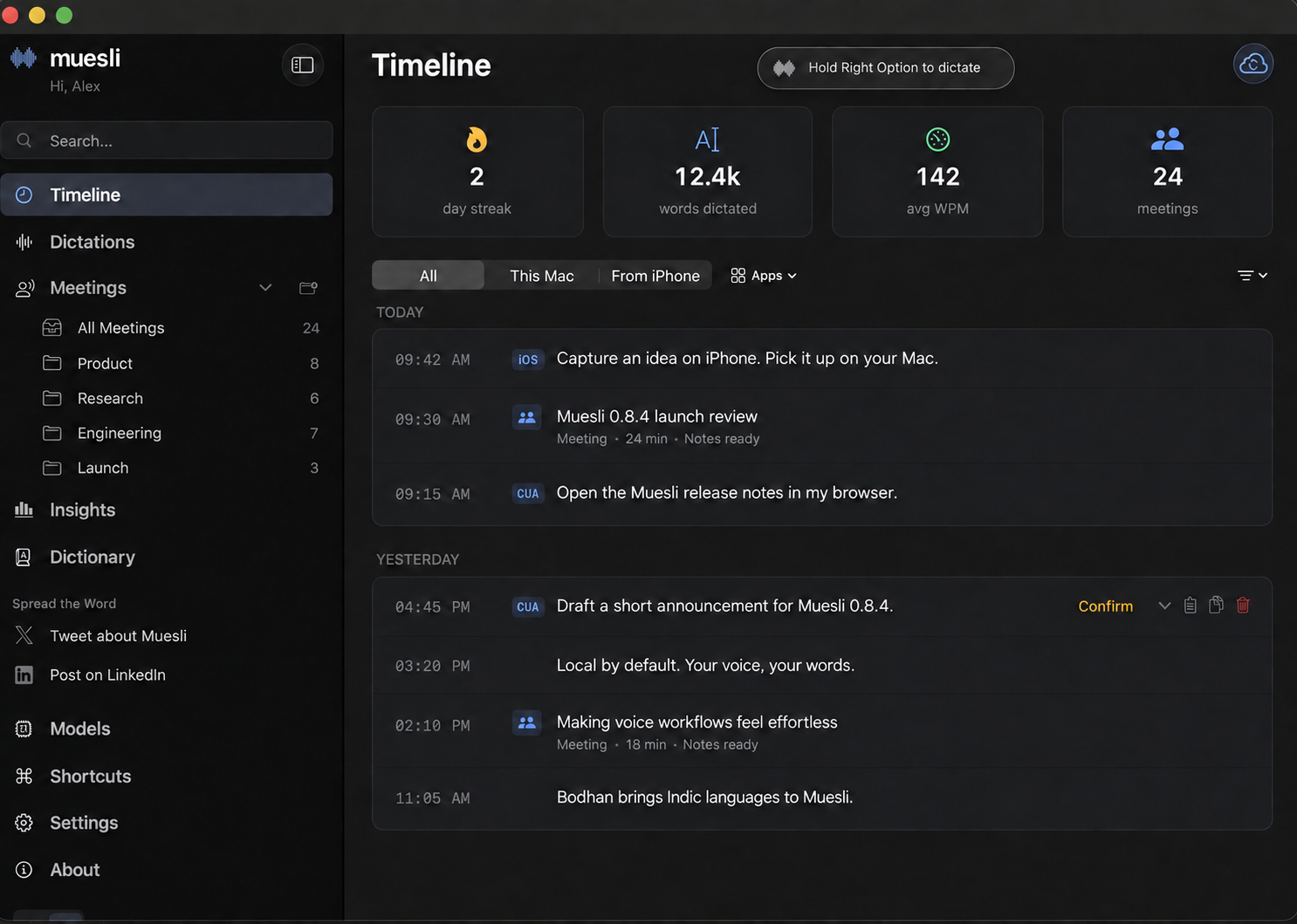
This image illustrates the primary user interface of the Muesli application, showing how users interact with their saved transcripts and meeting folders.
The project also includes a command-line interface (CLI) that works with coding agents like Claude Code or Codex. This allows agents with local shell access to analyze transcripts and perform tasks like finding meetings or transcribing files directly.
Experimental features like 'Time Turner' allow users to search local screen history by text or app, while 'Cotypist' provides on-device inline writing suggestions based on the user's input source.
Hardware Requirements and Limitations
Muesli requires an Apple Silicon Mac running macOS 14.2 or later. Because many models run locally, the app provides progress indicators to show when models are preparing before a recording begins.
While local processing enhances privacy, it can be resource-intensive. Some features, such as the 'Ask Meetings' chat and certain summarization steps, may consume significant system resources depending on the selected model.
The source does not provide specific performance benchmarks comparing the accuracy or latency of Muesli's local models against cloud-based competitors, leaving the trade-off between local privacy and cloud performance as a user-defined choice.
Technical Stack
The application is built using Swift, AppKit, and SwiftUI. For local inference, it utilizes a variety of runtimes including CoreML, Apple Neural Engine, MLX Swift, and llama.cpp.
Audio processing is handled via CoreAudio process taps and ScreenCaptureKit, with Silero VAD and pyannote diarization used for voice activity detection and speaker identification.
What Hacker News readers are saying
- Technical note: One commenter suggested that the developers consider reusing more mature foundations like RealtimeSTT to avoid the burden of building everything from scratch, while also noting the value of supporting non-Apple Silicon hardware. comment ↗
- Technical note: A user who built a similar tool shared their experience with the difficulty of diarizing notes without a bot in the call and asked if the developers had solved that specific issue. comment ↗
- Skeptical: One commenter questioned the necessity of so many similar apps in this category, suggesting that a simple workflow of transcribing and summarizing might be sufficient. comment ↗
- Technical note: A commenter expressed a desire for the ability to skip local post-processing or offload summarization to an external service to save on local system resources. comment ↗
Summarized opinions from the Hacker News thread, not verified facts. Read the full discussion ↗