Bitwarden has integrated an SSH agent into its desktop application, enabling users to store and manage Secure Shell (SSH) keys directly within an encrypted vault. This shift allows developers and system administrators to move away from storing private keys in local files, instead managing them through a centralized password manager that handles authentication for servers, Git commits, and other SSH-based services.
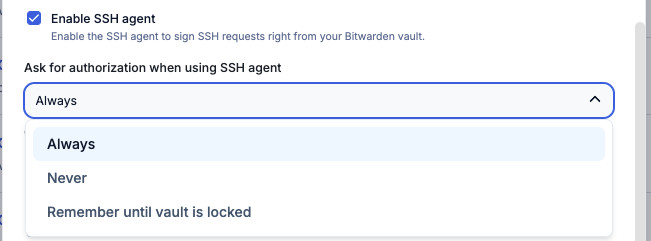
This image illustrates the initial step of enabling SSH storage within the Bitwarden desktop application.
Vault State and Authorization Logic
The behavior of the Bitwarden SSH agent is directly governed by the state of the user's vault. When the vault is logged out or locked (prior to the initial unlock), the agent will not list or sign requests.
Once the vault is unlocked, the agent becomes active. Users can choose whether the app should automatically approve requests or require manual authorization. If authorization is enabled, Bitwarden prompts the user to approve each specific request to use an SSH key, ensuring that background processes or remote servers cannot use a key without explicit consent.
“SSH agent forwarding allows a remote server you are accessing to authenticate to other servers using your keys, without exposing your private keys outside of your vault.”
— Bitwarden SSH Agent | Bitwarden
System Configuration and Integration
To use Bitwarden as the primary SSH agent, users must configure their operating system to route SSH requests to the Bitwarden socket. On Windows, this involves disabling the native OpenSSH Authentication Agent service.
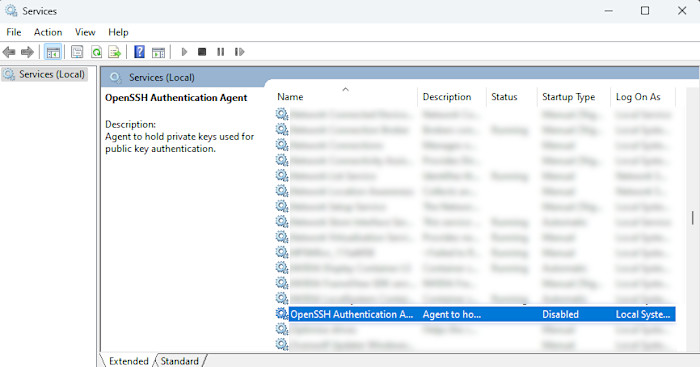
This visual demonstrates the Windows Services panel where users must disable the native agent.
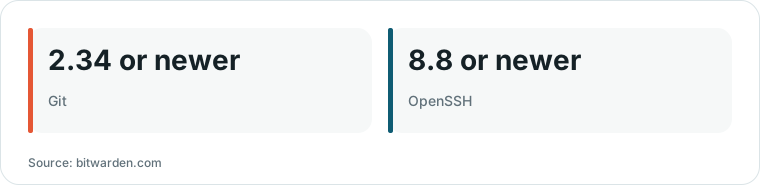
Chart drawn by HN Digest from figures reported by bitwarden.com; values are shown as written in the source.
On macOS and Linux, users must set the SSH_AUTH_SOCK environment variable to point to the specific socket created by the Bitwarden desktop app. For example, a macOS user might add a command to their .zshrc or .bashrc file to ensure the variable persists across terminal sessions.
Once configured, standard tools like ssh-add -L or git can communicate with Bitwarden for authentication, allowing for a seamless workflow across different development environments.
SSH Agent Forwarding and Security Trade-offs
The integration supports SSH agent forwarding, which allows a remote server to authenticate to a second server using the user's local keys. Because the keys remain inside the Bitwarden vault, the private keys are never actually exposed to the intermediate server; the server simply requests the local Bitwarden instance to perform the authentication.
While this improves convenience by removing the need to manually move keys between machines, it introduces a trade-off between ease of use and security. Users can mitigate the risks of agent forwarding by using the 'Ask for authorization' feature, which ensures that any request from a remote server to use a local key must be manually approved by the user.

This screenshot shows the 'Ask for authorization' feature used to mitigate risks associated with agent forwarding.
What Hacker News readers are saying
- Skeptical: Several commenters expressed skepticism regarding the severity of the report, noting that the relevant pull request was closed without being merged and that the feature is described as opt-in. comment ↗
- Alternative: One commenter suggested using a secure enclave on macOS to manage SSH keys, which would require a fingerprint for every new session to ensure the user is aware of every connection. comment ↗
- Alternative: Others recommended using a hardware security key, such as a Yubikey, configured to require a physical touch to confirm every authentication operation. comment ↗
- Skeptical: One commenter argued that the issue is a fundamental design flaw in how SSH agents work, noting that these tools are intended to facilitate secure infrastructure like jump hosts. comment ↗
Summarized opinions from the Hacker News thread, not verified facts. Read the full discussion ↗