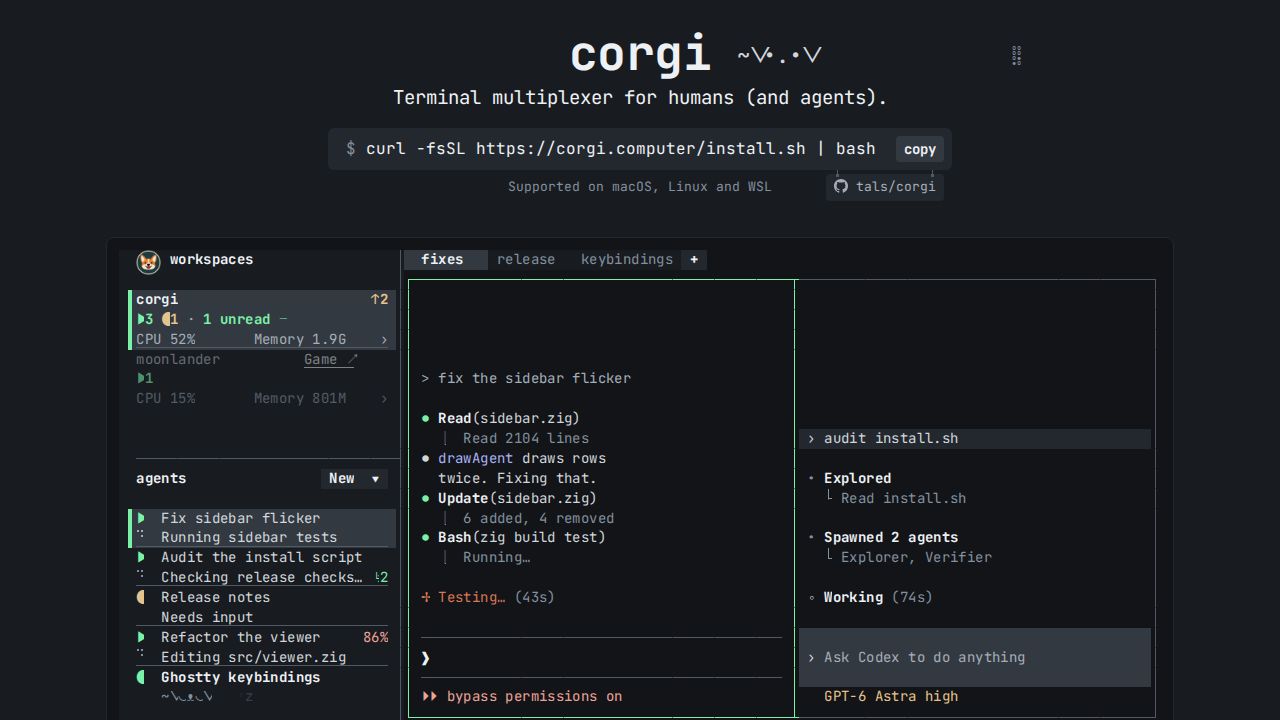
Corgi is a terminal multiplexer designed to manage and organize the activity of multiple AI agents. Developed as an alternative to tools like Herdr, Corgi focuses on 'agent ergonomics' by providing a centralized interface where users can monitor what various agents are doing in real-time. The tool includes a running feed of agent activity and a shortcut (F1) to navigate quickly between unread agent sessions. It is designed to work with various models and platforms, featuring a unified launcher for tools like Codex, Claude Code, and Pi.
The software incorporates several quality-of-life improvements to the terminal experience. These include the ability to copy links with a single click, image thumbnail previews, and the ability to paste images directly into the terminal (even over SSH) using cmd+v. Additionally, Corgi provides built-in tracking for CPU, memory, and GPU usage, which is broken down by workspace. These features are intended to make the environment feel more 'cozy' for developers who rely on cheap inference to organize tasks, such as identifying the contents of HTTP links or explaining specific worktrees.
Community discussion around the tool highlights its role as a replacement for existing multiplexers like cmux. While some users praise its simple design and utility for managing agent workflows, others have raised points regarding the security of installation methods. For instance, one commenter noted that installing via common package managers like Homebrew or npm may not provide sufficient sandboxing, potentially giving the software the same risk profile as a bash script downloaded via curl. Despite these considerations, the tool is being positioned as a way to improve the usability of multi-agent environments through better session management and inline usage tracking. editorial.evidence_sufficient: true,