SCM (Screen Memories) is a macOS application that enables users to search through their personal photo and video collections using artificial intelligence, all processed locally on the user's device. The tool describes itself as providing 'Deep AI search for every photo and every frame of video in any folder on macOS' with a local-first approach that requires no accounts, cloud uploads, or internet connectivity after initial setup. # Core Functionality The application offers five distinct search modes accessible through its interface: - **Files Mode**: Searches whole photos and videos by semantic meaning, combining vision model rankings with filename and phrase boosts - **Scenes Mode**: Segments videos into individual scenes and embeds them, allowing users to search for specific moments and jump directly to the corresponding timecode - **OCR Mode**: Performs optical character recognition on visible text within images and video frames using Tesseract, with support for English plus 35 toggleable languages - **Dialogue Mode**: Provides exact literal retrieval of spoken words in videos using Whisper speech-to-text, with results categorized into exact line, exact words, and words spoken tiers - **LLMs Mode** (opt-in): Enables conversational questioning about extracted content (dialogue, OCR text, and filenames) using a local language model via llama.cpp, with cited answers and streaming token output # Technical Implementation SCM employs multiple AI models that are downloaded once and then used entirely offline: - Vision models for image and scene understanding (switchable between CLIP ViT-L/14@336, SigLIP-2 variants) - Whisper for speech transcription (tiny.en or base.en models) - Tesseract for optical character recognition with multi-language support - Llama.cpp for the optional chat functionality The application builds a searchable library by creating content-based hashes (SHA-256) of media files to enable rename-proof deduplication. Video processing involves ffmpeg scanning for shot boundaries at user-configurable densities, with each segment's midpoint frame embedded for search. # Privacy and Accessibility Designed with privacy as a core principle, SCM ensures that 'your media never leaves the machine.' All AI model weights download once from trusted sources (Hugging Face, GitHub) and remain offline thereafter. The renderer operates as a sandboxed app:// bundle with context isolation and a content security policy restricted to 'self' (with Google Fonts CDN fallback for display). Installation is available via Homebrew for Apple Silicon Macs running macOS 12+, with the cask automatically clearing quarantine flags. The application is built using Electron, React, and Bun, with source code available on GitHub under an open-source license. # User Experience Features include saved search queries as tabs, semantic views accessible via keyboard shortcuts (⌘1-⌘5), and smart tab filtering that scopes searches to selected categories before executing. The interface provides visual feedback on search matches, including 'why it matched' badges and hover tooltips showing score breakdowns. For video results, opening a hit jumps directly to the identified moment in the playback interface.
This image represents the project's online presence and matches the description of SCM as an open-source macOS application for local AI search.
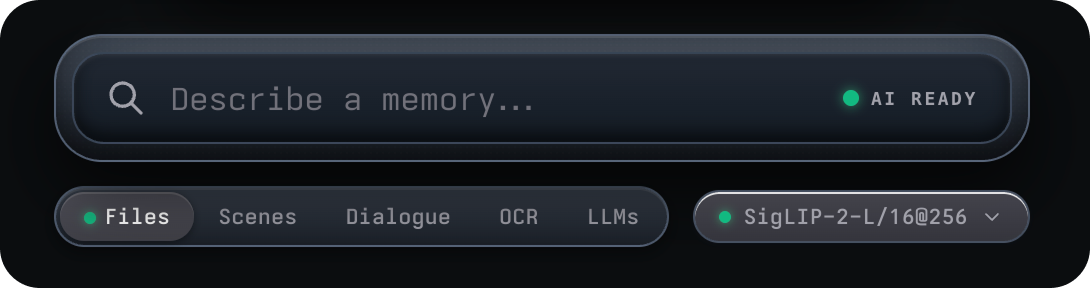
This image illustrates the search modes described in the Core Functionality section, showing how users can select between different AI-powered search types.