A beginner shader tutorial published by GDQuest on September 9, 2026, uses an animated portal to introduce graphics programming in Godot 4. The project is more than a visual exercise: it forces a change in how code is organized. Ordinary gameplay code usually proceeds as a sequence of instructions, while shader code expresses calculations that the GPU can apply in parallel across many pieces of geometry or many candidate pixels.
GDQuest defines a shader as a program that runs on the graphics processing unit and influences how models, sprites, particles, and other content are drawn. The guide nevertheless starts with an important qualification: beginners do not need to write shaders immediately. Godot includes adjustable effects, and its open-source shader repository contains reusable starting points. Custom code becomes more relevant when a developer needs a precise appearance, a novel effect, or greater control over rendering behavior.
The tutorial’s central distinction is between the vertex and fragment stages. The vertex stage processes positions that define an object’s geometry; in Godot, that work belongs in a function named `vertex()`. The fragment stage determines the color and transparency associated with each candidate pixel inside that geometry, using a function named `fragment()`. A fragment is not always a final visible pixel—it may be covered or discarded later—but treating it as the current pixel is a useful working model for introductory 2D work.
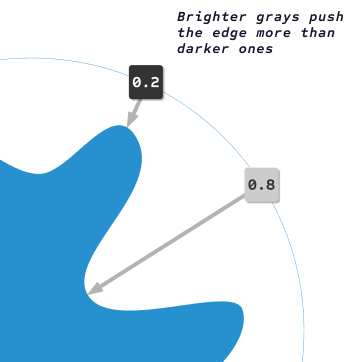
That distinction explains the guide’s practical teaching order. The portal project uses only the fragment stage because its outer rectangle does not need to change. Students first attach a `ShaderMaterial` to a `Sprite2D`, create a Godot 4 canvas-item shader, and replace a default template. They then build the effect through simple mathematical shapes, soft transitions produced with `smoothstep()`, masks that combine shapes, periodic functions that create motion, noise that makes boundaries look less mechanical, and texture sampling that imports image data.

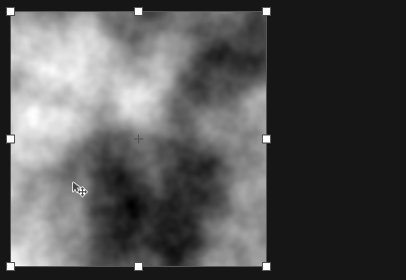
This matches the tutorial’s texture-sampling step, where image data is passed into the shader through a Godot shader parameter. Rights information is not stated.
The comparison illustrates how sampled noise breaks up otherwise mechanical shapes and gives the artist another value to combine into the final image. Rights information is not stated.
This demonstrates the tutorial’s motion technique: changing texture coordinates creates periodic movement without altering the portal rectangle’s geometry. Rights information is not stated.
The most transferable lesson is decomposition. A portal that appears to wiggle, breathe, shift color, and distort at once can be separated into small calculations whose outputs combine into one image. GDQuest presents this as an iterative technical-artist workflow, not as a claim that a reader will master shader design after one session. Its own prerequisites are explicit: the guide assumes familiarity with the Godot 4 editor, nodes, properties, and common GDScript. Someone new to Godot needs foundational instruction first.
The supplied GDQuest repository supports the broader point that shader work often begins by studying runnable examples. It lists 2D and 3D effects—including water, outlines, dissolve, glow, reflection, distortion, and noise-based cloud shadows—and says most include demo scenes. It also warns that the collection was being ported to Godot 4, so compatibility should be checked for individual examples. That warning matters because the existence of reusable code does not establish that every sample will work unchanged in every Godot 4 release.
The guide’s statement that custom shaders can make a game run faster is plausible in some rendering workflows, but the supplied material provides no benchmark, target hardware, or comparison with Godot’s built-in effects. It therefore does not establish a general performance gain. A shader can add substantial GPU work, and the right implementation depends on the effect, resolution, hardware, and rendering path. Readers should treat optimization as a measurement task rather than assume that replacing a built-in feature will reduce frame time.
The same evidence boundary applies to learning outcomes. GDQuest says the project teaches techniques transferable to other 2D and 3D effects and introduces Godot’s shader-debugging tools, but the packet contains no controlled evaluation of how well readers learn them. What the guide clearly establishes is its intended scope and method: a step-by-step fragment-shader project for people who already know Godot and GDScript, supported by examples that demonstrate how complex visuals can emerge from small, inspectable calculations.