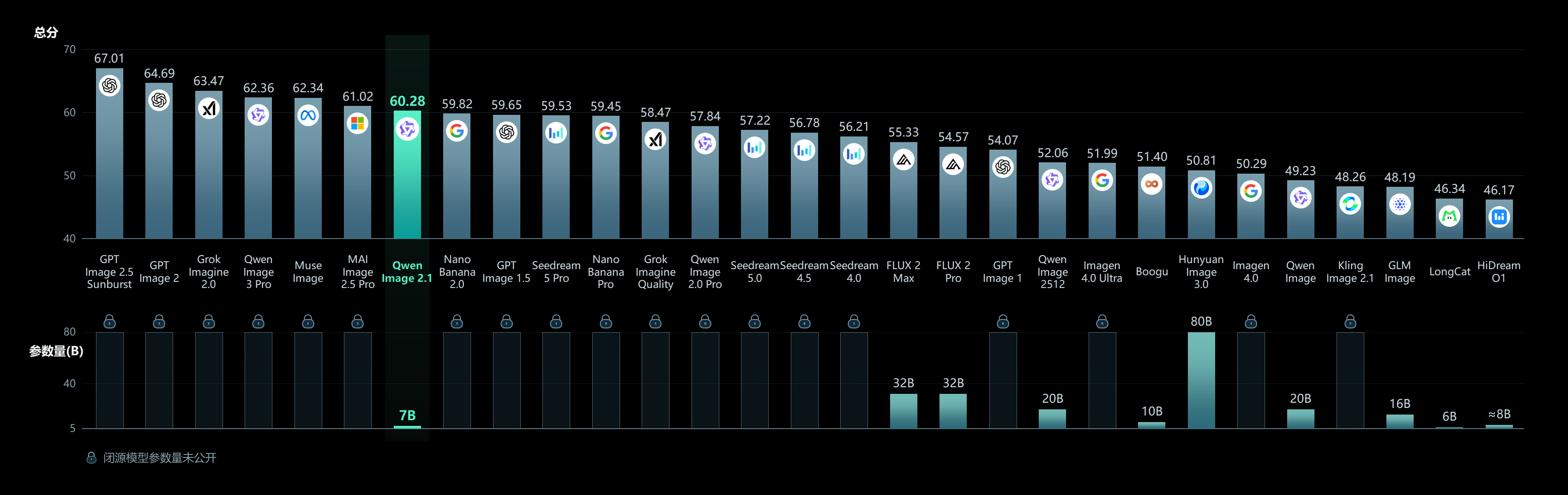
Qwen announced Image 2.1 on 20 September 2026. The release is presented as a unified model for text-to-image generation and image editing rather than as two unrelated systems. Its official repository describes the visual generation component as a 7-billion-parameter model built from 32 Single-Stream Diffusion Transformer, or DiT, layers. That specification is useful because it distinguishes the image-generation component from the separate text encoder used by the full pipeline.
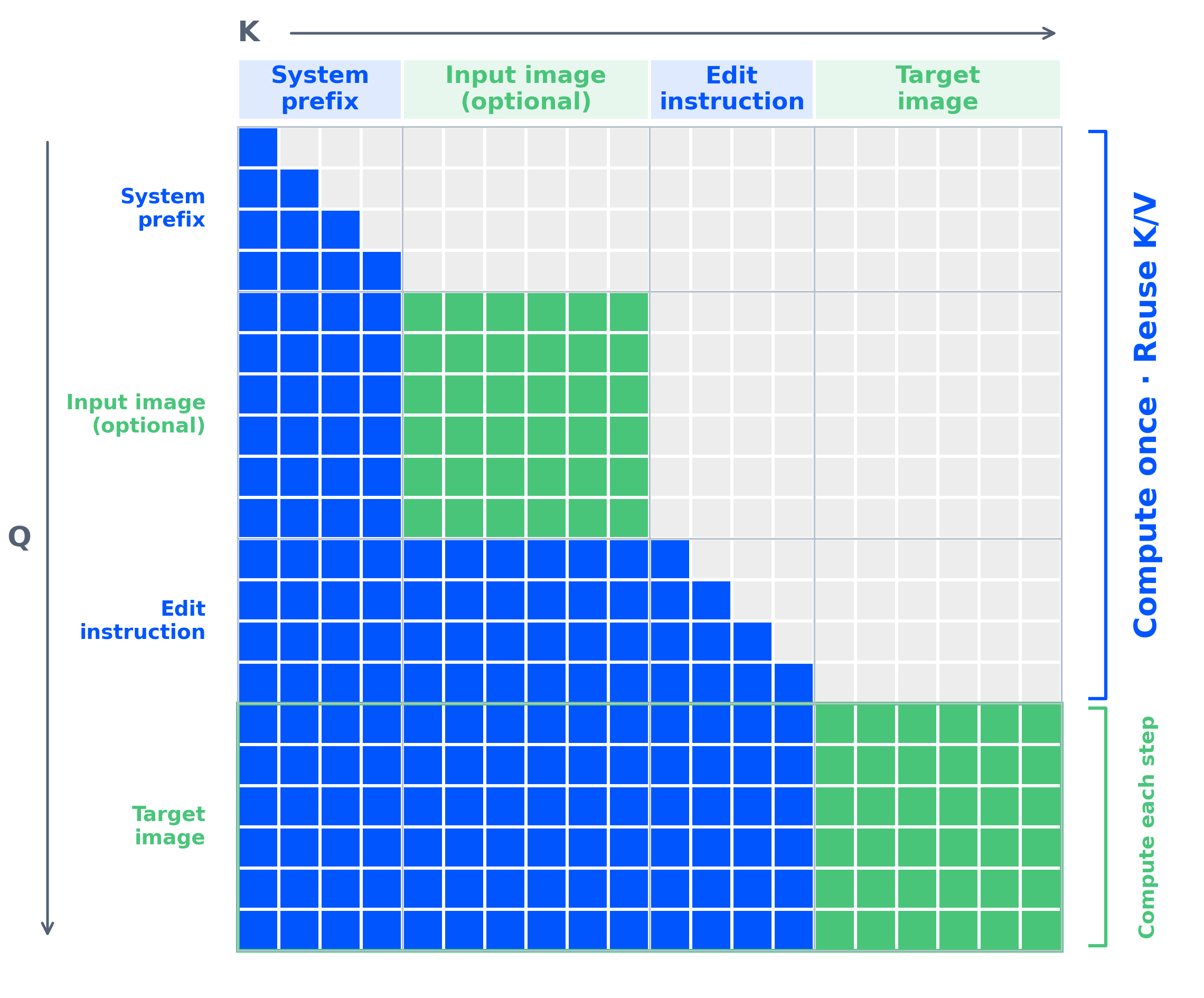
The architecture is designed around mixed-granularity attention and prefix key-value cache reuse. In the workflow described by Qwen, text and condition-image prefixes can be computed once and reused across denoising steps. The stated goal is to reduce repeated computation while retaining a single model that can generate images and apply edits. This is an engineering description from the project, not an independent benchmark result, so readers should treat the efficiency claim as a design objective until they compare it with measurements on their own hardware.
One of the most concrete additions is native transparency. Image 2.1 can generate ordinary images as well as RGBA images with an alpha channel. The same model can edit transparent layers and extract subjects from photographs. The repository provides a prompt pattern for requesting a transparent background and an example that saves the result as an RGBA image. This makes the release relevant to workflows that need cutouts, stickers, compositing, or product imagery without treating transparency as a separate post-processing model.
The transparent checkerboard and cutout demonstrate the native RGBA capability described in the preceding paragraph, rather than a separate background-removal step.
The editing path also accepts multiple references. Qwen documents support for up to 10 reference images in a multi-subject composition. Local changes can be indicated with circles, painted annotations, or separate masks, and the project says that identity should be preserved for people and products. The exact result will still depend on the prompt, the references, the selected editing method, and the quality of the input images. The documentation establishes the supported interface; it does not guarantee that every identity or every fine detail will survive every edit.

The visible edit illustrates how a local instruction can change part of an existing image, the editing workflow discussed above.
Qwen also highlights improved typography, portrait lighting, and fine details. The model natively supports 2K generation and lists several aspect ratios, including square, 4:3, 3:4, 3:2, 2:3, 16:9, and 9:16 outputs. These are documented capabilities and recommended configurations, not a claim that every rendering will be legible or artifact-free. The text-rendering examples are demonstrations of the intended use, while real-world legibility should be checked in the target language, font style, and resolution.

The combined subjects show the multi-reference composition feature described in the preceding paragraph; the example is a demonstration, not a quality guarantee.
The technical stack described in the repository is broader than the 7B DiT component. The text encoder is Qwen3-VL 8B, which encodes text instructions and condition images into a shared representation. The VAE is a 64-channel RGBA autoencoder with 16-times spatial compression, supporting native transparency. The scheduler uses Flow Matching with Euler discrete scheduling and dynamic shifting. Together, these components explain how the model can accept text and image conditions and produce either RGB or RGBA results, but they do not by themselves determine the quality of a particular output.
For users who want more elaborate prompts, the project provides two fine-tuned Qwen3.5-VL 9B prompt-rewriting checkpoints: one for text-to-image work and one for editing. The supplied code can run locally with Transformers or through a vLLM server, and the rewritten output includes a detailed prompt and an aspect-ratio choice. This is an optional part of the workflow. A user can still call the image pipeline directly, but the project recommends rewriting short prompts when more detailed descriptions are needed.
The release was accompanied by several integration paths. The official README says that Diffusers supports the model through QwenImage21Pipeline from Day 0. It also lists native Day-0 support in ComfyUI, high-performance inference through vLLM-Omni, native inference through SGLang-Diffusion, and acceleration through LightX2V. The model weights are linked from Hugging Face and ModelScope. These links make the release easier to try through established tools, but installation requirements, GPU memory, software versions, and operating-system support remain practical constraints.
The official quick-start examples use PyTorch, Transformers, Diffusers, Accelerate, and Pillow, and show a CUDA-oriented pipeline. The repository also describes CPU offload, vLLM offline inference, online serving, SGLang commands, and support for multiple accelerator platforms through FlagOS. That range of options is important for local experimentation, but it should not be read as a promise that every configuration will run at the same speed or fit on every consumer GPU. Users need to check the memory requirements of the selected backend and the precision and offload options they intend to use.
Licensing is a material part of the release. The repository is governed by the Qwen Research License Agreement, whose text defines Non-Commercial use as research or evaluation only. The license grants a limited, non-transferable, royalty-free right for non-commercial purposes and requires a separate commercial license for commercial use. Redistribution carries notice and attribution conditions, and the agreement includes additional requirements for models created or improved with the materials. Anyone planning a product, paid service, or commercial deployment should read the complete license and obtain the required permission rather than infer permission from the public availability of the weights.
The significance of Image 2.1 is therefore twofold. Technically, it combines a relatively compact 7B generation component with editing, transparency, multi-reference composition, 2K output, and a documented ecosystem of inference tools. Practically, its usefulness will depend on the chosen backend, the available hardware, the prompt and reference quality, and the intended license. The official release gives users a substantial set of capabilities to test, while the license makes the boundary between experimentation and commercial deployment unusually important to understand before building a workflow around the model.